|
Developing a GUI in C++ and DirectXStart with the basics - The Rendering Loop I’m going to start at the top, by defining a function that will calculate and draw one frame of our GUI system. Let’s call this function RenderGUI(). In PDL, RenderGUI does something like this: void CApplication::RenderGUI(void) { // get position and button status of mouse cursor // calculate mouse cursor’s effects on windows / send messages // render all windows // render mouse // flip to screen } Pretty straightforward for now. Basically, we grab the new position and status of the mouse cursor, calculate any changes that are caused by the new position, render all our windows, render the mouse cursor, then push the whole thing to the screen. The Mouse Now that we’ve got a main function, we’re going to create a mouse class. This mouse class will initialize the rodent, and will be responsible for querying its position and storing the results. Here’s the definition: class CMouse { public: CMouse(); // boring ~CMouse(); // boring int Init(LPDIRECTINPUT di); // we’ll talk about this later int Refresh(void); // we’ll talk about this later int GetButton(int index) { if (index ‹ 0 || index» NUMMOUSEBUTTONS) return(0); return(m_button[index]); } CPoint GetPosition(void) { return(m_position); } enum { NUMMOUSEBUTTONS = 3 }; // three button mouse private: LPDIRECTINPUTDEVICE m_mousedev; char m_button[NUMMOUSEBUTTONS]; // state of buttons CPoint m_position; // actual screen position }; Pretty straightforward class definition ...» | Код для вставки книги в блог HTML
phpBB
текст
|
|


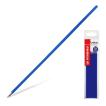 Стержни шариковые "Left Right", 10 штук, 0,3 мм, синие.









 Orthomol Immun Junior Сила иммунитета на страже Вашего ребенка