|
Microsoft Windows Embedded CE 6.0 Exam Preparation KitNOTE CELogFlush configuration For detailed information about the CeLogFlush tool, including how to configure this tool through registry settings, see the section "CeLogFlush Registry Settings" in the Windows Embedded CE 6.0 Documentation, available on the Microsoft MSDN Web site at Readlog Tool In addition to the graphical Remote Kernel Tracker application, you can process CELog data files by using the Readlog tool, located in the %_WINCEROOT%\Public\Common\Oak\Bin\i386 folder. Readlog is a command-line tool to process and display information not exposed in Remote Kernel Tracker, such as debug messages and boot events. It is often useful to analyze system activities in Remote Kernel Tracker first and then focus on an identified process or thread with the Readlog tool. The raw data that the CeLogFlush tool writes into the .clg file is ordered by zones to facilitate locating and extracting specific information. You can also filter the data and extend filtering capabilities based on extension DLLs to process custom data captured through the custom events collector ...» | Код для вставки книги в блог HTML
phpBB
текст
|
|


 Подушка "Verossa" (заменитель лебяжьего пуха), 70х70 см.
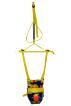 Прыгунки "три в одном" (прыгунки - тарзанка - качели).
 Кресло детское.





















 Orthomol Immun Junior Сила иммунитета на страже Вашего ребенка