|
Fedora™ Unleashed, 2008 editionPrivileges, also known as rights, are granted and revoked on four levels: в–єВ Global level — These rights allow access to any database on a server. в–єВ Database level — These rights allow access to all tables in a database. в–єВ Table level — These rights allow access to all columns within a table in a database. в–єВ Column level — These rights allow access to a single column within a database's table. NOTE Listing all the available privileges is beyond the scope of this chapter. See the MySQL documentation for more information. To add a user account, you connect to the database by typing mysql -u root -p and pressing Enter. You are then connected as the root user and prompted for a password. (You did set a password for the root user as instructed in the last section, right?) After you enter the root password, you are placed at the MySQL command prompt. To grant privileges to a user, you use the GRANT statement, which has the following syntax: grant what_to_grant ON where_to_grant TO user_name IDENTIFIED BY 'password'; The first option, what_to_grant, is the privileges you are granting to the user ...» | Код для вставки книги в блог HTML
phpBB
текст
|
|


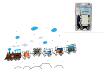 Фоторамка настенная, набор 5 штук, с декоративной наклейкой "Паровозик" (17x12 см).
 Бумага чертежная, А3, 297x420 мм, 100 листов.





 Orthomol Immun Junior Сила иммунитета на страже Вашего ребенка