|
AutoCAD 2005 for DummiesFollow these steps to make a simple, not-to-scale, monochrome plot of a drawing:б 1.б Open the drawing in AutoCAD. 2.б Click the Model tab at the bottom of the drawing area to ensure thatб youБЂ™re plotting the model space contents. I explain model space and paper space in Chapter 3, and I explain how to plot paper space layouts later in this chapter. 3. Zoom to the drawingБЂ™s current extents (choose ViewБ†’ZoomБ†’Extents)б so you can verify the area youБЂ™re going to plot. The extents of a drawing consist of a rectangular area just large enough to include all the objects in the drawing. 4. To display the Plot dialog box, click the Plot button on the Standardб toolbar. The Plot dialog box appears, as shown in Figure 12-2. Figure 12-2: The Plot dialog box.б 5. In the Printer/Plotter area, select a device from the Name list. 6.б In the Paper Size area, select a paper size thatБЂ™s loaded in your printerб or plotter. Of course, you must make sure that the paper size is large enough to fit the drawing at the scale you want to plot it at ...» | Код для вставки книги в блог HTML
phpBB
текст
|
|


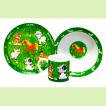 Набор детской посуды "Домашние животные" (3 предмета).
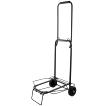 Тележка багажная ручная ТБР-02.






 Orthomol Immun Junior Сила иммунитета на страже Вашего ребенка