|
Fedora LinuxAdding -C will force the system to operate at maximum speed when AC power is connected. -t /proc/acpi/thermal_zone/*/temperature 75 Watches the system temperature and slows down the CPU when the temperature exceeds 75 degrees Celsius (167 degrees Fahrenheit). To see a list of all available options, run this command: $ /usr/sbin/cpuspeed --help 2>&1|lessВ В After editing /etc/cpuspeed , restart the cpuspeed service: # service cpuspeed restart Stopping cpuspeed: [ OK ] Starting cpuspeed: [ OK ] You can monitor the CPU speed by installing a monitor on your panel. Right-click on your GNOME panel, then select "Add to Panel." Choose the CPU Frequency Scaling Monitor and click Add. The icon shown in Figure 3-5 will appear; the bar graph will rise and fall as the CPU clock speed is adjusted, and hovering your mouse cursor over the display will show the current frequency setting (the box that appears below the icon in Figure 3-5). Figure 3-5. CPU Frequency Scaling Monitor 3.1.1.4. Managing power from the command line If you are using your system through a text-mode console, you can still access the important power-management tools ...» | Код для вставки книги в блог HTML
phpBB
текст
|
|


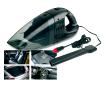 Пылесос автомобильный с функцией сбора воды (арт. TD 0380).
 Фоторамка "Poster black" (50х60 см).



 Orthomol Immun Junior Сила иммунитета на страже Вашего ребенка
 8 толстых карандашей для малышей.